
Kahfora | Tech. Business. Innovation.
  • Tech
  • Business
  • Computer
  • Auto
  • Innovation
No Result
View All Result
Kahfora | Tech. Business. Innovation.
  • Tech
  • Business
  • Computer
  • Auto
  • Innovation
No Result
View All Result
Kahfora | Tech. Business. Innovation.
No Result
View All Result

10 Proven Solutions for iPhone Heating Problem After Software Updating – Fix It Fast & Safely

Discover 10 powerful solutions for iPhone heating problem after software updating. Fix overheating issues quickly with expert tips and boost your device performance today.

Shahbaz Abid by Shahbaz Abid
Apr 21, 2026 | 2:14 pm
Reading Time: 6 mins read
0
10 Proven Solutions for iPhone Heating Problem After Software Updating – Fix It Fast & Safely

iPhone Heating Issues After Updates

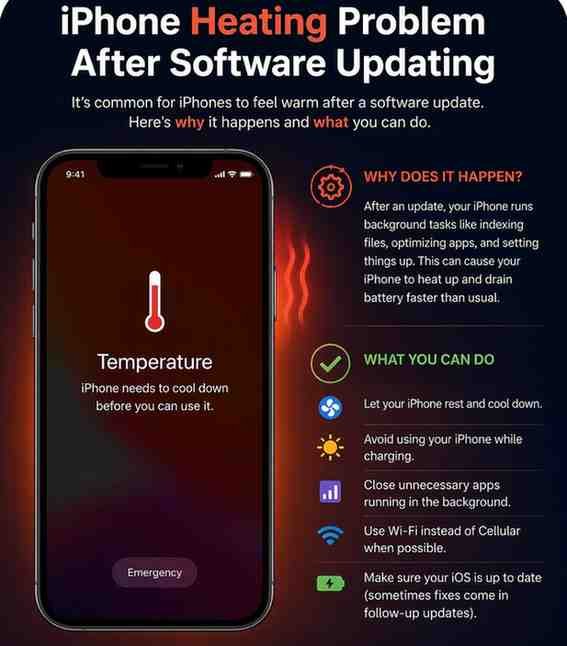
The iPhone heating problem after software updating is a common issue faced by many users. Right after installing a new iOS update, your device may feel unusually warm or even hot. While this can be alarming, it’s often temporary and fixable.

Software updates bring new features, security patches, and performance improvements. However, they can also trigger background processes that temporarily increase CPU usage. This leads to heat generation.

Understanding why this happens is the first step toward solving it effectively.

Why Software Updates Cause Overheating

Background Processes and Indexing

After an update, your iPhone performs tasks like:

Related Post

Govt Announces Small Relief in Petrol and Diesel Prices: Fuel Rates Increased 90% but Reduced Only 1%

Pakistan Economy After the US–Iran War: Crisis or Comeback?

Data-Backed Career Trends: The Most In-Demand Jobs for Gen Z in AI Economy

$3.45 Billion Repaid: Is Pakistan Finally Turning the Economic Corner?

  • Re-indexing files
  • Updating apps
  • Syncing data

These processes run in the background and consume significant power, causing heat.

App Compatibility Problems

Some apps may not yet be optimized for the new iOS version. This mismatch can lead to:

  • Excess CPU usage
  • Battery drain
  • Overheating

Signs Your iPhone Is Overheating

Common Symptoms to Watch

  • Device feels hot to touch
  • Battery drains quickly
  • Apps lag or crash
  • Charging slows down

When It Becomes Dangerous

If you see a warning like:

“iPhone needs to cool down before you can use it”

…it’s time to act immediately.


10 Solutions for iPhone Heating Problem After Software Updating


Solution 1: Restart Your iPhone

How Restarting Helps

Restarting clears temporary processes and refreshes system memory.

Steps:

  1. Press and hold the power button
  2. Slide to power off
  3. Turn it back on after 30 seconds

This simple step often fixes minor heating issues.


Solution 2: Update All Apps

Fixing Compatibility Issues

Outdated apps may not work properly with the new iOS.

What to do:

  • Open App Store
  • Tap “Update All”

Updated apps run more efficiently and reduce overheating.


Solution 3: Reduce Background Activity

Turn Off Background App Refresh

Apps refreshing in the background can overwork your phone.

Steps:

  • Go to Settings → General → Background App Refresh
  • Turn it off or limit it

Solution 4: Adjust Screen Brightness

Auto-Brightness Settings

High brightness generates heat and drains battery.

Tips:

  • Enable Auto-Brightness
  • Reduce manual brightness

Solution 5: Disable Location Services

Apps That Drain Battery

GPS usage is a major cause of overheating.

Steps:

  • Settings → Privacy → Location Services
  • Turn off unnecessary apps

Solution 6: Reset Settings

Safe Reset Without Data Loss

Resetting settings can fix hidden glitches.

Steps:

  • Settings → General → Transfer or Reset iPhone
  • Tap “Reset All Settings”

This won’t delete your data.


Solution 7: Remove Heavy or Buggy Apps

Identifying Problem Apps

Some apps consume excessive resources.

Check:

  • Settings → Battery
  • Look for apps with high usage

Delete or replace them.


Solution 8: Keep iPhone Cool Physically

Environmental Factors

External heat can worsen the problem.

Avoid:

  • Direct sunlight
  • Charging under pillows
  • Hot environments

Use your phone in a cool place.


Solution 9: Check Battery Health

When Battery Replacement Is Needed

Old batteries struggle after updates.

Check:

  • Settings → Battery → Battery Health

If below 80%, consider replacing it.


Solution 10: Restore iPhone to Factory Settings

Last Resort Fix

If nothing works, reset your device completely.

Steps:

  • Backup your data
  • Settings → General → Reset → Erase All Content

This removes deep system bugs.


Prevent Future iPhone Heating Issues

Best Practices After Updates

  • Wait a few hours after updating
  • Keep apps updated
  • Avoid heavy usage immediately
  • Restart after installing updates

These habits keep your iPhone running smoothly.

FAQs About iPhone Heating Problem After Software Updating

1. Is it normal for iPhone to heat after update?

Yes, temporary heating is normal due to background processes.

2. How long does overheating last?

Usually 24–48 hours after the update.

3. Can overheating damage my iPhone?

Prolonged overheating can harm battery and internal components.

4. Should I stop using my phone if it gets hot?

Yes, let it cool down before using it again.

5. Does charging increase overheating?

Yes, especially fast charging or using phone while charging.

6. Will future updates fix heating issues?

Yes, Apple often releases patches to fix such bugs.
Share212Tweet133Send
Shahbaz Abid

Shahbaz Abid

Tech blogger - LUMS Alumni - dedicated to exploring the latest trends in technology, software, and digital innovation. I enjoy breaking down complex concepts into simple, engaging content for readers of all backgrounds. Through my writing, I aim to inform, inspire, and keep audiences updated on emerging tools, industry insights, and the evolving tech landscape.

Related Posts

Govt Announces Small Relief in Petrol and Diesel Prices: Fuel Rates Increased 90% but Reduced Only 1%
Business

Govt Announces Small Relief in Petrol and Diesel Prices: Fuel Rates Increased 90% but Reduced Only 1%

One of the main economic issues facing Pakistani citizens, companies, and policymakers is fuel pricing. Every aspect of daily life...

by Maheen Irshad
May 16, 2026
Pakistan Economy After the US–Iran War: Crisis or Comeback?
Business

Pakistan Economy After the US–Iran War: Crisis or Comeback?

Countries like Pakistan don't merely observe from the sidelines when great nations like the United States and Iran go to...

by Maheen Irshad
April 27, 2026

Leave a Reply Cancel reply

Your email address will not be published. Required fields are marked *

Recent News

Govt Announces Small Relief in Petrol and Diesel Prices: Fuel Rates Increased 90% but Reduced Only 1%

Govt Announces Small Relief in Petrol and Diesel Prices: Fuel Rates Increased 90% but Reduced Only 1%

May 16, 2026
Pakistan Economy After the US–Iran War: Crisis or Comeback?

Pakistan Economy After the US–Iran War: Crisis or Comeback?

April 27, 2026
Data-Backed Career Trends: The Most In-Demand Jobs for Gen Z in AI Economy

Data-Backed Career Trends: The Most In-Demand Jobs for Gen Z in AI Economy

April 25, 2026
$3.45 Billion Repaid: Is Pakistan Finally Turning the Economic Corner?

$3.45 Billion Repaid: Is Pakistan Finally Turning the Economic Corner?

April 25, 2026
Is Wall USB Charging Bad for Your Battery? A Scientific Deep Dive

Is Wall USB Charging Bad for Your Battery? A Scientific Deep Dive

April 22, 2026

Trending

$3.45 Billion Repaid: Is Pakistan Finally Turning the Economic Corner?
Business

$3.45 Billion Repaid: Is Pakistan Finally Turning the Economic Corner?

April 25, 2026
Saudi Arabia’s new $3 billion commitment helps stabilise Pakistan’s economy.
Business

Saudi Arabia’s new $3 billion commitment helps stabilise Pakistan’s economy.

April 16, 2026
21 Hours, No Deal: Inside the Tense Islamabad Talks Between US -Iran
Business

21 Hours, No Deal: Inside the Tense Islamabad Talks Between US -Iran

April 16, 2026
High-Level U.S. Delegation Arrives in Islamabad for Strategic Talks
Business

High-Level U.S. Delegation Arrives in Islamabad for Strategic Talks

April 16, 2026
KSE-100 Hits Record 168,000 as PSX Rally Accelerates After US–Iran Ceasefire
Business

KSE-100 Hits Record 168,000 as PSX Rally Accelerates After US–Iran Ceasefire

April 16, 2026
Kahfora | Tech. Business. Innovation.

Technology, Business Trends & Innovation

Categories

  • Auto
  • Business
  • Career
  • Latest
  • Main
  • Tech
  • About
  • Privacy Policy
  • Contact Us

© 2026 - All rights reserved - Kahfora.com.

No Result
View All Result
  • Home
  • Tech
  • Business
  • Computer
  • Auto
  • Environment
  • Innovation
  • Career

© 2026 - All rights reserved - Kahfora.com.